

The LilyGO T-Display board is not shown in the boards list. It is an ESP32 Dev Module.
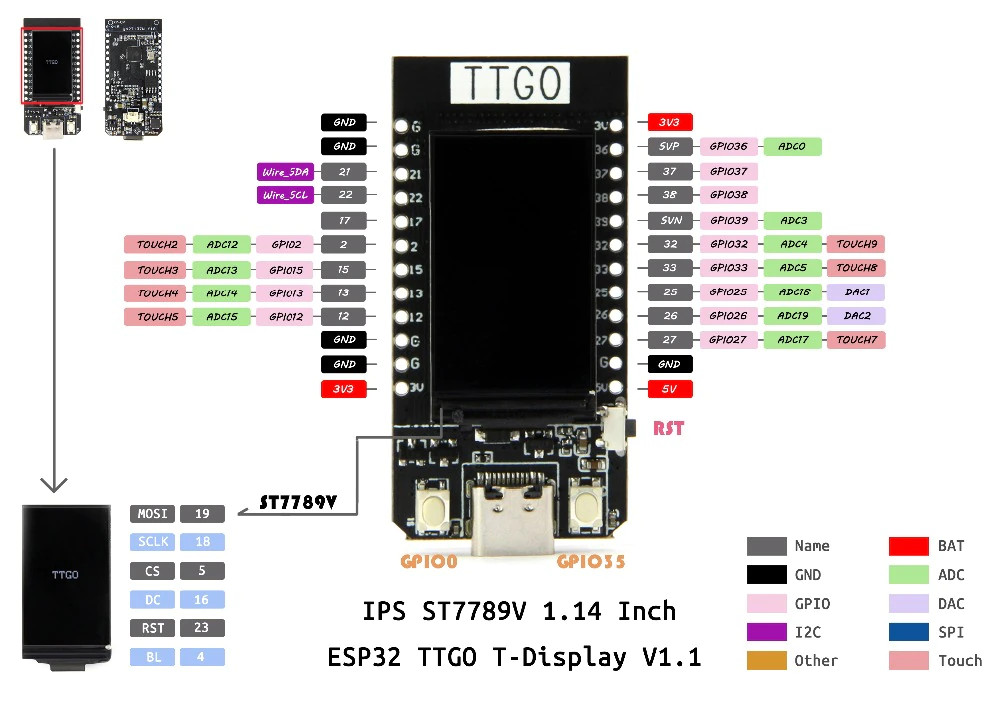
The T-Display has i2c on pins 21 and 22, so in the Arduino IDE you need to initialize the Wire library with "Wire.begin(21,22);".
To use the TFT_eSPI library needs a little config for the T-Display. The User_Setup.h need to be edited as below.
#define ST7789_DRIVER

// IPS 1.14 in T-Display
#define TFT_WIDTH 135
#define TFT_HEIGHT 240


#define TFT_MOSI 19
#define TFT_SCLK 18
#define TFT_CS 5
#define TFT_DC 16
#define TFT_RST 23
#define TFT_BL 4
To use the Adafruit GFX library, you just need to define the Arduino_DataBus and Arduino_GFX objects.
#include <Arduino_GFX_Library.h>

#define GFX_BL 4
Arduino_DataBus *bus = new Arduino_ESP32SPI(16 /* DC */, 5 /* CS */, 18 /* SCK */, 19 /* MOSI */, GFX_NOT_DEFINED /* MISO */);
Arduino_GFX *gfx = new Arduino_ST7789(
    bus, 23 /* RST */, 0 /* rotation */, true /* IPS */, 135 /* width */, 240 /* height */,
    52 /* col offset 1 */, 40 /* row offset 1 */, 53 /* col offset 2 */, 40 /* row offset 2 */);
The rotation 0 is portrait, 1 is landscape.